Session 1: Data Acquisition
For executing the notebook, run the requirements file (see Downloads).
Learning goals
By the end of this notebook you will know how to:
Get data from OpenML
Scrape data from web sources
Build a human-in-the-loop annotation pipeline
Aggregate crowdsourcing data
Prepare DataSheets for your data set
Public Data APIs
Often data for a given task can be found in public data sources, such as:
Direct downloads are often the fastest first step before scraping.
OpenML
Open Machine Learning Initiative
OpenML is an open, collaborative platform for sharing and organizing machine learning research, founded in 2012.
| Component | Description |
|---|---|
| Datasets | Curated tabular, image, and text datasets |
| Tasks | Standardized ML problems with fixed splits and metrics |
| Flows | Serialized ML pipelines and algorithm descriptions |
| Runs | Logged results of applying a Flow to a Task |
As of 2024, OpenML hosts 4,000+ datasets, 10,000+ tasks, and 1,000,000+ experimental runs.
import openml
import pandas as pd

# OpenML ID for the classic Titanic dataset
dataset = openml.datasets.get_dataset(40945)

# Extract features and target
# categorical_indicator helps identify which columns to treat as categories
X, y, categorical_indicator, attribute_names = dataset.get_data(
    dataset_format="dataframe",
    target=dataset.default_target_attribute
)

print(f"Dataset: {dataset.name} | Rows: {X.shape[0]}, Cols: {X.shape[1]}")
X.head(3)
Dataset: Titanic | Rows: 1309, Cols: 13
Data Scraping
When data is not available via APIs or direct downloads, we can often still get it by scraping it from the web.
Tabular scraping with pandas
Just like in some previous lectures, we start with Wikipedia tables.
Run the next cell, then choose a URL and inspect available tables interactively.
import pandas as pd
import requests
from io import StringIO

# Wikipedia started blocking requests without a user-agent header, so we need to set it to mimic a browser
headers = {
    "User-Agent": "Mozilla/5.0 (Macintosh; Intel Mac OS X 10_15_7) AppleWebKit/537.36 (KHTML, like Gecko) Chrome/124.0.0.0 Safari/537.36",
    "Accept-Language": "en-US,en;q=0.9",
}
response = requests.get("https://en.wikipedia.org/wiki/Berlin_population_statistics", headers=headers, timeout=20)
response.raise_for_status()

# Parse HTML text
tables = pd.read_html(StringIO(response.text))
print(f"Found {len(tables)} tables. Showing table 0 ({tables[0].shape[0]} rows, {tables[0].shape[1]} columns):")
tables[0].head(3)
Found 7 tables. Showing table 0 (13 rows, 4 columns):
HTML parsing with BeautifulSoup
Now we move to more sophisticated data scraping not just from tables, but from the HTML page structure.
A great playground to test scraping: https://
toscrape .com We will use: https://
books .toscrape .com to extract book titles, prices, ratings and descriptions.
import requests
from bs4 import BeautifulSoup

url = "https://books.toscrape.com"
response = requests.get(url, timeout=20)
response.raise_for_status()

# Build the soup object parsing the HTML
soup = BeautifulSoup(response.text, "html.parser")

print(f"Title: {soup.title.get_text(strip=True)}")
Title: All products | Books to Scrape - Sandbox
# Extract product information
product_pods = soup.select("article.product_pod")

single_product = product_pods[0] # Select first product
print(single_product.prettify())
<article class="product_pod">
<div class="image_container">
<a href="catalogue/a-light-in-the-attic_1000/index.html">
<img alt="A Light in the Attic" class="thumbnail" src="media/cache/2c/da/2cdad67c44b002e7ead0cc35693c0e8b.jpg"/>
</a>
</div>
<p class="star-rating Three">
<i class="icon-star">
</i>
<i class="icon-star">
</i>
<i class="icon-star">
</i>
<i class="icon-star">
</i>
<i class="icon-star">
</i>
</p>
<h3>
<a href="catalogue/a-light-in-the-attic_1000/index.html" title="A Light in the Attic">
A Light in the ...
</a>
</h3>
<div class="product_price">
<p class="price_color">
£51.77
</p>
<p class="instock availability">
<i class="icon-ok">
</i>
In stock
</p>
<form>
<button class="btn btn-primary btn-block" data-loading-text="Adding..." type="submit">
Add to basket
</button>
</form>
</div>
</article>
<article class="product_pod">
 <div class="image_container">
  <a href="catalogue/a-light-in-the-attic_1000/index.html">
   <img alt="A Light in the Attic" class="thumbnail" src="media/cache/2c/da/2cdad67c44b002e7ead0cc35693c0e8b.jpg"/>
  </a>
 </div>
 <p class="star-rating Three">
  <i class="icon-star">
  </i>
  <i class="icon-star">
  </i>
  <i class="icon-star">
  </i>
  <i class="icon-star">
  </i>
  <i class="icon-star">
  </i>
 </p>
 <h3>
  <a href="catalogue/a-light-in-the-attic_1000/index.html" title="A Light in the Attic">
   A Light in the ...
  </a>
 </h3>
 <div class="product_price">
  <p class="price_color">
   £51.77
  </p>
  <p class="instock availability">
   <i class="icon-ok">
   </i>
   In stock
  </p>
  <form>
   <button class="btn btn-primary btn-block" data-loading-text="Adding..." type="submit">
    Add to basket
   </button>
  </form>
 </div>
</article>Selector Syntax
Basics:
tag-> all elements of that tag
Example:p.class-> elements with a class
Example:.price_color#id-> element with a specific id
Example:#product_description
Combinations:
A B-> descendant of A (any depth)
Example:article pA > B-> direct child of A
Example:article > pA + B-> immediate next sibling
Example:h2 + pA ~ B-> any following sibling
Example:#product_description ~ p
Attribute Matching:
[attr="value"]-> has attribute
Example:a[id="product_description"]
# Extract title information
title_element = single_product.select_one("h3 a")
title_element
<a href="catalogue/a-light-in-the-attic_1000/index.html" title="A Light in the Attic">A Light in the ...</a>text_title = title_element.get_text() # Get content within the <a> tag
attr_title = title_element.get("title") # Get value of an attribute
print(f"Title from get_text(): {text_title}")
print(f"Title from title attribute: {attr_title}")Title from get_text(): A Light in the ...
Title from title attribute: A Light in the Attic
# Get description from subpage
href = title_element.get("href")
response = requests.get(f"{url}/{href}", timeout=20)
response.raise_for_status()

subsoup = BeautifulSoup(response.text, "html.parser")
description = subsoup.select_one("div[id='product_description'] + p").get_text(strip=True)
description
"It's hard to imagine a world without A Light in the Attic. This now-classic collection of poetry and drawings from Shel Silverstein celebrates its 20th anniversary with this special edition. Silverstein's humorous and creative verse can amuse the dowdiest of readers. Lemon-faced adults and fidgety kids sit still and read these rhythmic words and laugh and smile and love th It's hard to imagine a world without A Light in the Attic. This now-classic collection of poetry and drawings from Shel Silverstein celebrates its 20th anniversary with this special edition. Silverstein's humorous and creative verse can amuse the dowdiest of readers. Lemon-faced adults and fidgety kids sit still and read these rhythmic words and laugh and smile and love that Silverstein. Need proof of his genius? RockabyeRockabye baby, in the treetopDon't you know a treetopIs no safe place to rock?And who put you up there,And your cradle, too?Baby, I think someone down here'sGot it in for you. Shel, you never sounded so good. ...more"Lets bring it together now:
import requests
from bs4 import BeautifulSoup
import pandas as pd
from IPython.display import display

url = "https://books.toscrape.com"
response = requests.get(url, timeout=20)
response.raise_for_status()
soup = BeautifulSoup(response.text, "html.parser")

def extract_books_single_page(soup: BeautifulSoup, url: str):
    # Retrieve all books
    product_pods = soup.select("article.product_pod")

    # Dictionary in which we fill our data
    scraped_data = {"Title": [], "Price": [], "Availability": [], "Rating": [], "Description": []}

    # Loop over the products to extract
    for product in product_pods:
        # Info directly on main page
        title = product.select_one("h3 a").get("title")
        price = product.select_one("div.product_price p.price_color").get_text()[1:]
        stock = product.select_one("div.product_price p.instock.availability").get_text().strip()
        rating = product.select_one("p").get("class")[1]

        # Info on subpage
        href = product.select_one("h3 a").get("href")
        response = requests.get(url=f"{url}/{href}", timeout=3)
        response.raise_for_status()
        subsoup = BeautifulSoup(response.text, "html.parser")
        description = subsoup.select_one("article.product_page > p").get_text() # Sometime you might need ">" to enforce direct child selection

        scraped_data["Title"].append(title)
        scraped_data["Price"].append(price)
        scraped_data["Availability"].append(stock)
        scraped_data["Rating"].append(rating)
        scraped_data["Description"].append(description)
    return scraped_data

scraped_data = pd.DataFrame(extract_books_single_page(soup, url))

display(scraped_data.head())scraped_data.to_csv("../downloads/books.csv", index=False)Selenium
Some websites use measures, that make it difficult to scrape simply with requests and BeautifulSoup. For example, by:
dynamic content loading
pagination
bot detection
For this, we can use Selenium, to automate a browser that can interact with the page as a human would. Selenium has many features such as:
waiting for elements to load
clicking buttons and links
filling out forms
handling cookies and sessions
pip install seleniumHuman-in-the-loop annotation
For many tasks, labels are not available and must be created manually. For this we can use a tool like Label Studio (https://
Install and run Label Studio
pip install label-studio
label-studio
(runs on port 8080 by default: http://
Then open the shown URL, create a new project, and import tasks from the next cell output.
Labeling Demonstration
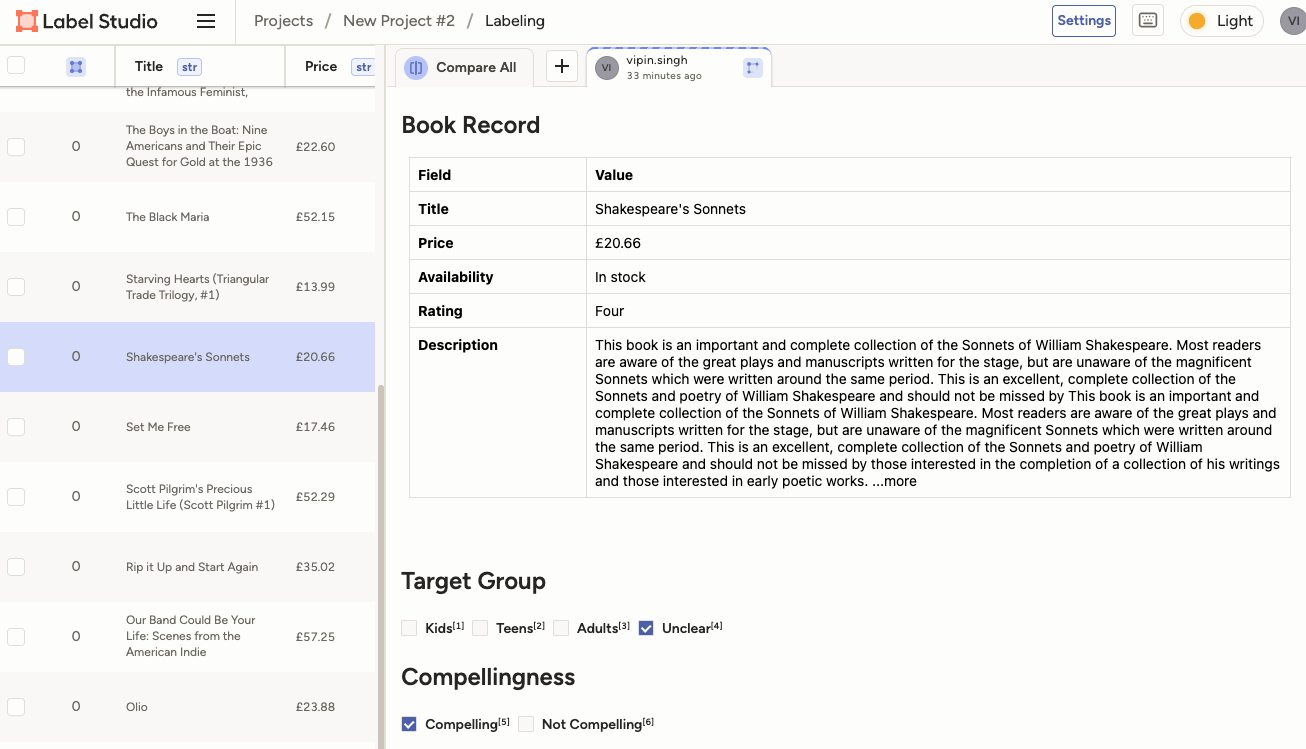
Download the scraped book data from the Download section and import it as tasks in Label Studio. Use the following label configuration:
<View>
<Header value="Book Record"/>
<HyperText name="table" value="<div style='font-family: -apple-system, BlinkMacSystemFont, Segoe UI, Roboto, Helvetica Neue, Arial, sans-serif;'>
<table style='width:100%; border-collapse:collapse; font-size:14px;'>
<tr><th style='text-align:left; padding:8px; border:1px solid #ddd; width:160px;'>Field</th><th style='text-align:left; padding:8px; border:1px solid #ddd;'>Value</th></tr>
<tr><td style='padding:8px; border:1px solid #ddd;'><strong>Title</strong></td><td style='padding:8px; border:1px solid #ddd;'>$Title</td></tr>
<tr><td style='padding:8px; border:1px solid #ddd;'><strong>Price</strong></td><td style='padding:8px; border:1px solid #ddd;'>$Price</td></tr>
<tr><td style='padding:8px; border:1px solid #ddd;'><strong>Availability</strong></td><td style='padding:8px; border:1px solid #ddd;'>$Availability</td></tr>
<tr><td style='padding:8px; border:1px solid #ddd;'><strong>Rating</strong></td><td style='padding:8px; border:1px solid #ddd;'>$Rating</td></tr>
<tr><td style='padding:8px; border:1px solid #ddd; vertical-align:top;'><strong>Description</strong></td><td style='padding:8px; border:1px solid #ddd;'>$Description</td></tr>
</table>
</div>"/>
<Header value="Target Group"/>
<Choices name="target_group" toName="table" choice="single" showInline="true">
<Choice value="Kids"/>
<Choice value="Teens"/>
<Choice value="Adults"/>
<Choice value="Unclear"/>
</Choices>
<Header value="Compellingness"/>
<Choices name="compellingness" toName="table" choice="single" showInline="true">
<Choice value="Compelling"/>
<Choice value="Not Compelling"/>
</Choices>
</View>This is how it looks in Label Studio:
Crowdsourcing Data Annotation
Definition: Collecting labeled data from multiple non-expert annotators, typically via platforms like Amazon Mechanical Turk, Prolific, or Label Studio.
| Aspect | Traditional | Crowdsourced |
|---|---|---|
| Annotators | Few experts | Many non-experts |
| Cost | High ($50-200/hour) | Low ($5-15/hour) |
| Scale | Limited (100s) | Massive (1000s-millions) |
| Quality | High per-label | Variable, needs aggregation |
Key Insight: Multiple noisy labels can yield better ground truth than a single expert label when properly aggregated.
Challenges and Solutions
Benefits:
Rapid scaling for large datasets (ImageNet: 14M images via crowdsourcing)
Lower cost per annotation
Diverse perspectives reduce single-annotator bias
Challenges:
| Challenge | Impact | Mitigation Strategy |
|---|---|---|
| Noisy labels | Reduced model accuracy | Aggregate multiple labels |
| Spammers | Wasted budget | Quality control (gold standard questions) |
| Ambiguous tasks | Low agreement | Clear instructions, examples |
| Annotator bias | Skewed distributions | Model annotator reliability (Dawid-Skene) |
Best practice: Collect 3-5 labels per instance and aggregate statistically.
Inter-Annotator Agreement Metrics
Measure consistency across annotators to assess task clarity and label quality.
| Metric | Type | Formula | Interpretation |
|---|---|---|---|
| Percent Agreement | 2 annotators | Simple, ignores chance | |
| Cohen’s Kappa | 2 annotators | Corrects for chance agreement | |
| Fleiss’ Kappa | 3+ annotators | Extension of Cohen’s | Multi-annotator, assumes fixed set |
| Krippendorff’s Alpha | Any setup | Most general | Handles missing data, any scale |
Kappa Scale: < 0 (worse than chance), 0.0-0.2 (slight), 0.2-0.4 (fair), 0.4-0.6 (moderate), 0.6-0.8 (substantial), 0.8-1.0 (near perfect)
# Code Example 1: Computing Inter-Annotator Agreement

import numpy as np
from sklearn.metrics import cohen_kappa_score
from statsmodels.stats.inter_rater import fleiss_kappa, aggregate_raters

# Simulated annotations: 50 items, 3 annotators, 4 classes
np.random.seed(42)
n_items, n_annotators, n_classes = 50, 3, 4

# Generate ground truth and noisy labels
true_labels = np.random.randint(0, n_classes, n_items)
annotations = np.array([
    np.where(np.random.random(n_items) > 0.15, true_labels,
             np.random.randint(0, n_classes, n_items))
    for _ in range(n_annotators)
]).T  # Shape: (50 items, 3 annotators)

# Cohen's Kappa (pairwise)
kappa_01 = cohen_kappa_score(annotations[:, 0], annotations[:, 1])
kappa_02 = cohen_kappa_score(annotations[:, 0], annotations[:, 2])
kappa_12 = cohen_kappa_score(annotations[:, 1], annotations[:, 2])

print("Inter-Annotator Agreement")
print("=" * 45)
print(f"Cohen's Kappa (A0 vs A1): {kappa_01:.3f}")
print(f"Cohen's Kappa (A0 vs A2): {kappa_02:.3f}")
print(f"Cohen's Kappa (A1 vs A2): {kappa_12:.3f}")
print(f"Mean Kappa (pairwise)   : {np.mean([kappa_01, kappa_02, kappa_12]):.3f}")

# Fleiss' Kappa (all annotators)
agg_table, _ = aggregate_raters(annotations)
fleiss = fleiss_kappa(agg_table)
print(f"Fleiss' Kappa (3 raters): {fleiss:.3f}")
Inter-Annotator Agreement
=============================================
Cohen's Kappa (A0 vs A1): 0.677
Cohen's Kappa (A0 vs A2): 0.728
Cohen's Kappa (A1 vs A2): 0.703
Mean Kappa (pairwise) : 0.703
Fleiss' Kappa (3 raters): 0.702
Label Aggregation: Majority Voting
Simplest aggregation: Choose the label that appears most often.
Where is the label given by annotator for item .
| Pros | Cons |
|---|---|
| Simple, interpretable | Treats all annotators equally |
| Fast, no training needed | Ignores annotator reliability |
| Works well with high agreement | Fails with systematic bias |
When to use: High-quality crowd, clear task, Fleiss’ Kappa > 0.6
# Code Example 2: Majority Voting with Tie-Breaking

from scipy.stats import mode

def majority_vote(annotations):
    """
    annotations: (n_items, n_annotators) array of integer labels
    Returns: (n_items,) array of aggregated labels
    """
    result = mode(annotations, axis=1, keepdims=False)
    return result.mode

# Apply majority voting
mv_labels = majority_vote(annotations)

# Evaluate against ground truth
mv_accuracy = (mv_labels == true_labels).mean()
individual_accuracies = [
    (annotations[:, j] == true_labels).mean()
    for j in range(n_annotators)
]

print("Majority Voting Results")
print("=" * 45)
for j, acc in enumerate(individual_accuracies):
    print(f"Annotator {j} accuracy     : {acc:.3f}")
print("-" * 45)
print(f"Majority vote accuracy     : {mv_accuracy:.3f}")
print(f"Improvement over best solo : {mv_accuracy - max(individual_accuracies):.3f}")

# Show first 10 items
print("\nFirst 10 items (True | A0 A1 A2 | MV):")
for i in range(10):
    ann_str = ' '.join(map(str, annotations[i]))
    print(f"  {i:2d}: {true_labels[i]} | {ann_str} | {mv_labels[i]}")
Majority Voting Results
=============================================
Annotator 0 accuracy : 0.840
Annotator 1 accuracy : 0.920
Annotator 2 accuracy : 0.860
---------------------------------------------
Majority vote accuracy : 0.960
Improvement over best solo : 0.040
First 10 items (True | A0 A1 A2 | MV):
0: 2 | 2 0 2 | 2
1: 3 | 3 3 3 | 3
2: 0 | 0 0 0 | 0
3: 2 | 2 2 2 | 2
4: 2 | 0 2 0 | 0
5: 3 | 3 3 3 | 3
6: 0 | 0 0 1 | 0
7: 0 | 1 0 0 | 0
8: 2 | 2 2 2 | 2
9: 1 | 1 1 1 | 1
Dawid-Skene Model (1979)
Key idea: Model each annotator’s confusion matrix and the true (latent) labels jointly.
Probabilistic formulation:
= true label for item (latent)
= label from annotator on item (observed)
= P(annotator labels class as )
Estimation via EM algorithm:
E-step: Compute posterior for each item
M-step: Update annotator confusion matrices
Repeat until convergence
Benefits: Discovers low-quality annotators automatically, weights them appropriately.
# Code Example 3: Dawid-Skene Implementation (Simplified EM)

def dawid_skene(annotations, n_classes, max_iter=20, tol=1e-4):
    """
    annotations: (n_items, n_annotators)
    Returns: aggregated labels, annotator error rates
    """
    n_items, n_ann = annotations.shape

    # Initialize with majority vote
    labels = majority_vote(annotations)

    # Confusion matrices: (n_annotators, n_classes, n_classes)
    confusion = np.zeros((n_ann, n_classes, n_classes))

    for iteration in range(max_iter):
        old_labels = labels.copy()

        # M-step: estimate confusion matrices
        for j in range(n_ann):
            for k in range(n_classes):
                mask = (labels == k)
                if mask.sum() > 0:
                    for l in range(n_classes):
                        confusion[j, k, l] = ((annotations[mask, j] == l).sum() + 1) / (mask.sum() + n_classes)

        # E-step: estimate labels from weighted votes
        for i in range(n_items):
            log_probs = np.zeros(n_classes)
            for k in range(n_classes):
                for j in range(n_ann):
                    log_probs[k] += np.log(confusion[j, k, annotations[i, j]] + 1e-10)
            labels[i] = np.argmax(log_probs)

        # Check convergence
        if np.all(labels == old_labels):
            break

    # Compute error rates (1 - accuracy on diagonal)
    error_rates = [1 - confusion[j].diagonal().mean() for j in range(n_ann)]

    return labels, error_rates, confusion
# Code Example 4: Comparing Aggregation Methods
# Run Dawid-Skene
ds_labels, error_rates, confusion_matrices = dawid_skene(annotations, n_classes)
ds_accuracy = (ds_labels == true_labels).mean()
print("Dawid-Skene Results")
print("=" * 45)
for j, err in enumerate(error_rates):
print(f"Annotator {j} error rate : {err:.3f}")
print("-" * 45)
print(f"Dawid-Skene accuracy : {ds_accuracy:.3f}")
print(f"Majority vote accuracy : {mv_accuracy:.3f}")
print(f"Best individual accuracy : {max(individual_accuracies):.3f}")
print("-" * 45)
print(f"DS improvement over MV : {ds_accuracy - mv_accuracy:.3f}")
# Show confusion matrix for worst annotator
worst_ann = np.argmax(error_rates)
print(f"\nConfusion Matrix for Annotator {worst_ann} (worst):")
print(confusion_matrices[worst_ann].round(2))
# Count disagreements
disagree = (mv_labels != ds_labels).sum()
print(f"\nMV vs DS disagreements: {disagree}/{n_items} items ({disagree/n_items*100:.1f}%)")Dawid-Skene Results
=============================================
Annotator 0 error rate : 0.276
Annotator 1 error rate : 0.271
Annotator 2 error rate : 0.269
---------------------------------------------
Dawid-Skene accuracy : 0.960
Majority vote accuracy : 0.960
Best individual accuracy : 0.920
---------------------------------------------
DS improvement over MV : 0.000
Confusion Matrix for Annotator 0 (worst):
[[0.67 0.13 0.13 0.07]
[0.07 0.73 0.13 0.07]
[0.07 0.07 0.73 0.13]
[0.05 0.05 0.14 0.76]]
MV vs DS disagreements: 0/50 items (0.0%)
Best Practices
| Method | When to Use | Complexity |
|---|---|---|
| Majority Voting | High agreement (Kappa > 0.6), trusted crowd | O(n) |
| Dawid-Skene | Variable annotator quality, systematic bias | O(n × iter) |
| MACE, GLAD | Adversarial annotators, item difficulty varies | Higher |
Best Practices:
Collect 3-5 labels per item (diminishing returns after 5)
Use qualification tasks to filter low-quality workers
Measure IAA early; if Kappa < 0.4, redesign the task
Start with majority vote, upgrade to Dawid-Skene if annotator quality varies
Report both aggregated accuracy and IAA in papers
References:
Dawid & Skene (1979). Maximum likelihood estimation from incomplete data. JRSS-C.
Snow et al. (2008). Cheap and Fast—But is it Good? EMNLP.
Datasheets for Datasets
Core Idea: Every dataset should be accompanied by a datasheet documenting its motivation, composition, collection process, and recommended uses.
Analogy: Electronics components come with datasheets — why not datasets?
| Problem | Solution |
|---|---|
| Datasets used without context | Documented motivation and scope |
| Unknown biases in training data | Transparent collection process |
| Models deployed in harmful ways | Clear intended and out-of-scope uses |
Goal: Improve transparency, accountability, and reproducibility in ML.
The Seven Core Sections
Every datasheet should answer questions in seven areas:
| Section | Key Questions |
|---|---|
| 1. Motivation | Why was the dataset created? Who funded it? |
| 2. Composition | What data does it contain? How many instances? |
| 3. Collection | How was data acquired? Was consent obtained? |
| 4. Preprocessing | What cleaning was done? Who labeled the data? |
| 5. Uses | What tasks is it intended for? What should be avoided? |
| 6. Distribution | How is it shared? Under what license? |
| 7. Maintenance | Who maintains it? Will it be updated? |
Why Datasheets Matter
Undocumented datasets have caused measurable harm:
| Case Study | Harm | Missing Documentation |
|---|---|---|
| Facial recognition systems | Higher error rates for darker-skinned women | No demographic breakdown |
| Hate speech classifiers | Over-flagging African-American English | No dialect information |
| Medical imaging AI | Poor performance on non-Western patients | Geographic composition undisclosed |
| Recidivism prediction | Discriminatory against Black defendants | Historical bias not documented |
Datasheets shift responsibility from implicit to explicit.
# Code Example 1: Datasheet as a Structured Object

datasheet = {
    "dataset_name": "FacialExpressions-5K",
    "version": "1.0",
    "motivation": {
        "purpose": "Expression recognition for assistive technology",
        "funded_by": "EU Horizon Grant #12345"
    },
    "composition": {
        "instances": 5000,
        "type": "Facial images (224x224 JPEG)",
        "labels": ["happy", "sad", "neutral", "surprised", "angry"],
        "sensitive_data": "Contains biometric data; consent obtained"
    },
    "uses": {
        "intended": ["Affective computing research"],
        "prohibited": ["Surveillance", "Hiring decisions", "Law enforcement"]
    },
    "distribution": {
        "license": "CC BY-NC 4.0",
        "url": "https://example.org/dataset"
    }
}

import json
print(json.dumps(datasheet, indent=2))
{
"dataset_name": "FacialExpressions-5K",
"version": "1.0",
"motivation": {
"purpose": "Expression recognition for assistive technology",
"funded_by": "EU Horizon Grant #12345"
},
"composition": {
"instances": 5000,
"type": "Facial images (224x224 JPEG)",
"labels": [
"happy",
"sad",
"neutral",
"surprised",
"angry"
],
"sensitive_data": "Contains biometric data; consent obtained"
},
"uses": {
"intended": [
"Affective computing research"
],
"prohibited": [
"Surveillance",
"Hiring decisions",
"Law enforcement"
]
},
"distribution": {
"license": "CC BY-NC 4.0",
"url": "https://example.org/dataset"
}
}
Related Documentation Frameworks
Datasheets are part of a broader ecosystem of responsible AI documentation:
| Framework | Focus | Proposed By |
|---|---|---|
| Datasheets for Datasets | Dataset documentation | Gebru et al., 2021 |
| Model Cards | ML model reporting | Mitchell et al., 2019 |
| Data Nutrition Labels | Quick dataset overview | Holland et al., 2018 |
| FactSheets | AI service transparency | Arnold et al., 2019 |
Together they create a full provenance chain from data collection to deployment.
Best Practices Data Sheets
Complete all seven sections before publishing a dataset
Document demographic breakdowns in the Composition section
Be explicit about prohibited uses, not just intended ones
Report inter-annotator agreement for labeled data
Version datasheets alongside datasets
Reference: Gebru, T. et al. (2021). Datasheets for Datasets. Communications of the ACM, 64(12), 86-92. Gebru et al. (2021)
Summary Session 1
Many data sets can be obtained from APIs / platforms
Scraping is easy
Annotating data remains challenging
High quality annotations require aggregations accounting for low quality labels
Prepare DataSheets for your data set
Preparation for next session
Next session, we will start working with our cluster interactively, so please prepare by:
Setting up VPN access with FortiClient to the BHT, see documentation: VPN Zugang einrichten (use a translator if needed)
Working through the Quickstart Guide of our cluster: Quickstart (Cluster Docs)
- Gebru, T., Morgenstern, J., Vecchione, B., Vaughan, J. W., Wallach, H., III, H. D., & Crawford, K. (2021). Datasheets for datasets. Communications of the ACM, 64(12), 86–92. 10.1145/3458723