Session 5: Dashboards and Demos
Learning goals
Build interactive dashboards to explore ML outputs
Communicate findings effectively to non-technical stakeholders
Streamlit

Streamlit is an open-source Python library that makes it easy to create and share web apps
Easy-to-read code
Popular in the data science community for building interactive dashboards
As simple as creating a plot or writing a print statement
Why Streamlit in this course
Building dashboards is important for communicating results to stakeholders
Fast path from modeling results to shareable interface
Good for model comparison, what-if interaction, and error analysis views
To get started you can install Streamlit using pip:
pip install streamlit
streamlit hello
Example Streamlit app
We have a simple Streamlit app in streamlit_example.py that simulates a spam detection workflow:
import numpy as np
import streamlit as st

def random_email():
	return {
		"subject": str(np.random.choice(["Urgent invoice update", "Meeting reminder", "Free gift card inside", "Account verification needed"])),
		"body": str(np.random.choice(["Please review the attached note.", "Click now to claim your prize.", "Open attachment for details.", "See details at your convenience."]))
	}

def model_predict(email, spam_probability):
    np.random.seed(hash(email.__str__()) % (2**8)) # Seed based on email content
    return np.random.choice(["Spam", "Not spam"], p=[spam_probability, 1 - spam_probability])

st.set_page_config(page_title="DSW Spam Demo", page_icon="📧")
st.title("DSW Spam Detection Demo")
st.write("A tiny example for showing a spam classifier workflow. Uses deterministic random predictions to simulate a model.")

if "email" not in st.session_state:
	st.session_state.email = random_email()

if st.button("Generate random email"):
	st.session_state.email = random_email()
	st.rerun()

st.subheader("Message")
title = st.text_input("Title", value=st.session_state.email["subject"])
body = st.text_area("Body", value=st.session_state.email["body"])
spam_probability = st.slider("Spam probability", 0.0, 1.0, 0.5, 0.05)

if st.button("Predict"):
    st.session_state.email = {"subject": title, "body": body}
    prediction = model_predict(st.session_state.email, spam_probability)

    if prediction == "Spam":
        st.error(f"Prediction: {prediction}")
    else:
        st.success(f"Prediction: {prediction}")
To run locally, download the file (and dependencies) and run:
streamlit run streamlit_example.py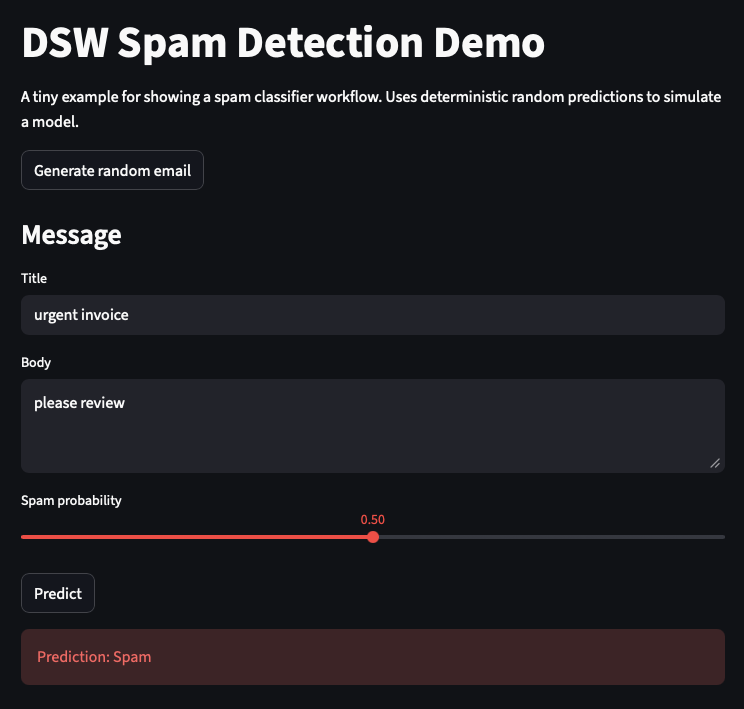
How to host Streamlit apps
Streamlit Community Cloud:
The easiest option: Connect your GitHub repo and it automatically deploys your app
Visit streamlit.io/cloud
Best for public apps and prototypes
Self-hosted options:
Containerize your app (Docker) and deploy the container
You can use our Kubernetes cluster (see session 2) to deploy
Basic deployment steps:
# Install dependencies
pip install -r requirements.txt

# Run locally to test
streamlit run your_app.py
Further Streamlit examples
Visit the Streamlit App-Gallery for more examples of what you can build with Streamlit
They also let you fork and deploy
Streamlit limitations
Streamlit is great for easy apps, but has some limitations:
For highly custimized UIs, you may need to use more flexible frameworks like
React(JavaScript)Not ideal for complex multi-page apps or heavy backend logic
Recommendation: Start with Streamlit, and if you find yourself trying to hack around its limitations, consider switching to a more flexible framework.
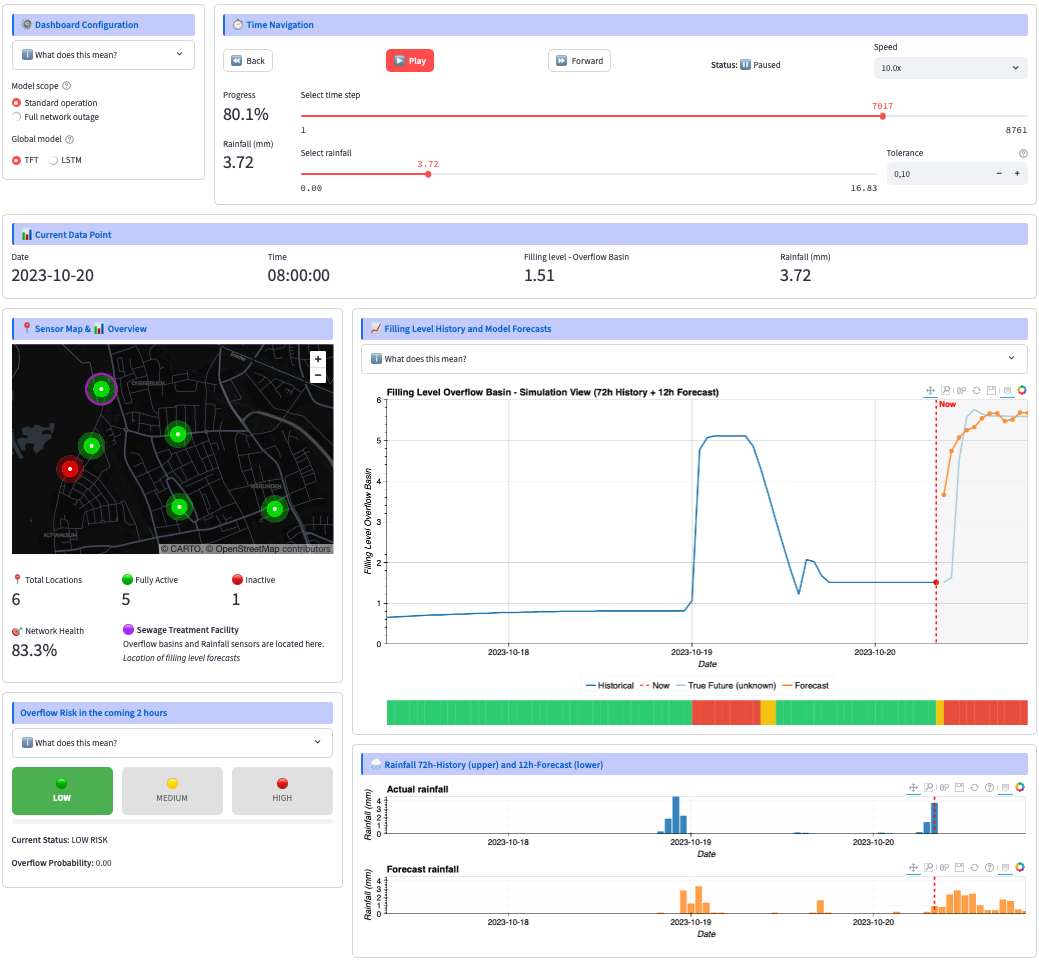
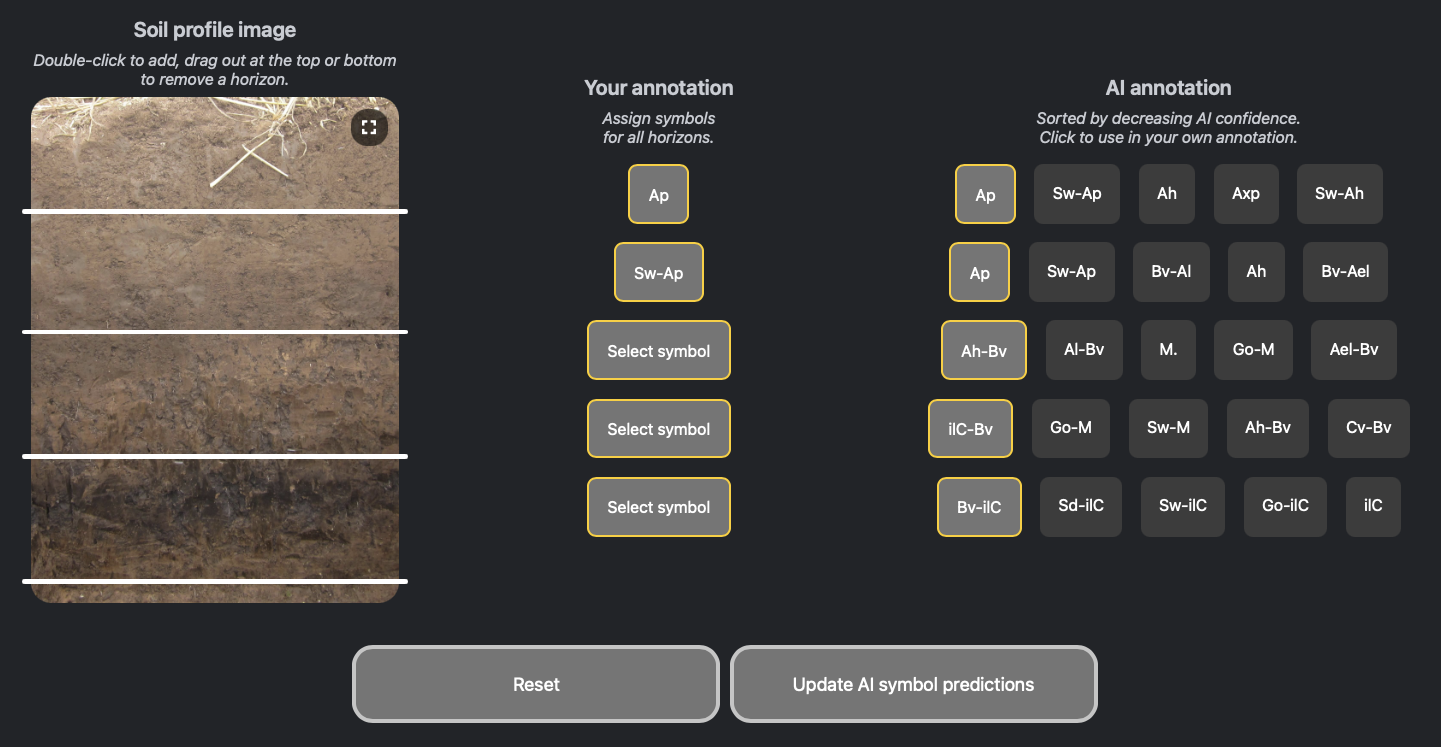
Some Demo Showcases
RIWWER dashboard: Shows a simulated live view of time series forecasts for sewer system management:
SoilNet app: Interactive segmentation and classification of soil images:
Backend with FastAPI

So far we’ve built interactive UIs with Streamlit. For simple demos, Streamlit runs standalone — the UI and model logic live in the same process.
But in production ML systems, you often want to separate the backend from the frontend. This allows you to:
Scale the model serving independently from the UI
Serve the same model from multiple clients (web app, mobile app, etc.)
Keep your model infrastructure decoupled and testable
This is where FastAPI comes in — it’s a modern Python web framework for building robust APIs that can host your model.
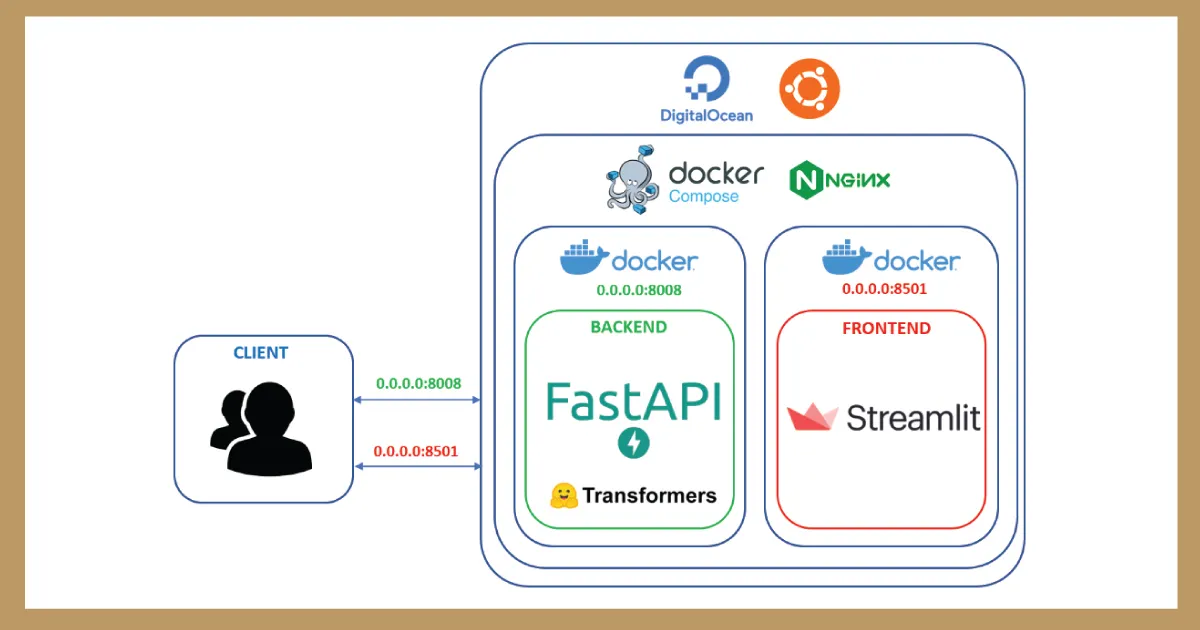
Image Source: https://
Minimal example
from fastapi import FastAPI

app = FastAPI()

@app.get('/predict')
def predict(features: dict):
    prediction = model.predict([features['input']])
    return {'prediction': prediction.tolist()}
Running the API
uvicorn main:app --reloadTesting the API
Visit
http://localhost:8000/docsfor interactive Swagger UIOr use
curl:curl -X POST 'http://localhost:8000/predict' \ -H 'Content-Type: application/json' \ -d '{"input": [1.0, 2.0, 3.0]}'
End-to-end example
Next we will build an end-to-end example of a Streamlit app with a FastAPI backend and deploy it to the cluster.
Download the spam_demo folder from the download section and have a look at the code to understand how the frontend and backend are structured and how they communicate.

Build and push the Docker images:
docker buildx build --platform linux/amd64 -t <your-dockerhub-username>/spam-frontend -f frontend/Dockerfile --push .docker buildx build --platform linux/amd64 -t <your-dockerhub-username>/spam-backend -f backend/Dockerfile --push .Update the image names in
k8s/deployment.ymlto point to your Docker Hub images and the URL’s subdomain to be unique.
Deploy to the cluster:
kubectl apply -f k8s/deployment.ymlLook at your resources in the cluster:
kubectl get pods,deploy,services,ingressAccess the app at
http://spam-demo-<some-unique-part>.project.ris.bht-berlin.de(only accessible from internal network or via VPN)To clean up the resources on the cluster after you’re done, run:
kubectl delete deploy/spam-frontend deploy/spam-backend service/spam-frontend-service service/spam-backend-service ingress/spam-demo
Summary & Key Takeaways
| Aspect | Key Tool | Key Finding |
|---|---|---|
| Interactive UI | Streamlit | Fast path from ML results to shareable web app |
| Prototyping | streamlit run | Standalone app, no separate backend needed for demos |
| Deployment | Streamlit Community Cloud, BHT cluster (Kubernetes) | Free hosting via GitHub connect |
| Production scale | FastAPI + uvicorn | Decouple frontend from model serving |
| Real-world examples | SoilNet, RIWWER, Streamlit App Gallery | Dashboards and demos to get some ideas |
Bottom line: Start with Streamlit for prototypes. If Streamlit isn’t flexible enough, you can try with React (JavaScript). Scale to FastAPI when you need multiple clients or independent model serving.